The complexity, handled.
No technical knowledge required. Three integrations quietly do the work behind the scenes — so you can focus on your clients.
From payment to profile, in seconds.
The moment a Stripe payment clears, the purchased service lands on the client's Mindbody profile — no login, no manual entry.
- 1
Customer clicks your Stripe payment link
Share your payment link on your website, social media, or email. No Mindbody login required.
- 2
Payment is processed through Stripe
Customer completes purchase using Stripe's secure checkout. Credit card, Apple Pay, Google Pay — all supported.
- 3
We receive the webhook instantly
Within seconds of payment, our system receives all the transaction details from Stripe.
- 4
Customer is matched or created in Mindbody
We check if the customer exists by email. If they do, great. If not, we create their profile automatically.
- 5
Service is attached to their account
The purchased class pack, membership, or service appears in their Mindbody account immediately. Ready to use.
From signature to Mindbody, automatically.
One link for every client. We match them to Mindbody, refresh their profile, file the signed PDF, and keep a verifiable trail.
- 1
Send one waiver link to all clients
New clients, returning clients, walk-ins, workshop attendees — everyone uses the same link. Share it in confirmation emails, on your website, or at the front desk.
- 2
Client fills out the form
They enter their contact info, emergency contact, any health conditions, and sign the waiver. Clean, mobile-friendly experience.
- 3
We match them to Mindbody
Using their email, we find their existing Mindbody profile. If they're new, we create one automatically. No duplicates.
- 4
Profile is updated
Address, phone, DOB, emergency contact, and consent preferences all sync to their Mindbody profile. Always current.
- 5
Signed waiver is stored
The PDF appears in their Documents tab in Mindbody. The waiver date is visible on their profile. Staff can verify at a glance.
- 6
Audit trail is recorded
We keep an external log of when the waiver was sent, viewed, and signed. If you ever need proof, you have it.
From ad click to CRM — and back into cheaper ads.
We run your ads for you. Every purchase flows through Stripe into Mindbody, then back to Meta — so the algorithm learns from real buyers, and your cost per sale keeps falling.
- 1
We launch your Meta ads
We plan, build, and manage your campaigns — creative, targeting, and budget included. You approve; we run.
- 2
Customer taps the ad and buys in one click
The ad links straight to Stripe checkout. No account creation, no login — a purchase is one tap away from the feed.
- 3
The sale lands in your Mindbody CRM
Customer matched or created, service attached — the same automatic sync that powers everything else.
- 4
The purchase is reported back to Meta
We feed every real sale back into Meta's algorithm automatically. No pixels to babysit, no spreadsheets.
- 5
Your ads get cheaper and better
Meta optimizes toward people who actually buy — not people who just click. Every sale sharpens the next ad.
Then the loop repeats — every sale makes the next ad cheaper.
See exactly what gets updated.
When a client submits their waiver, all the highlighted fields below are automatically filled in their Mindbody profile.
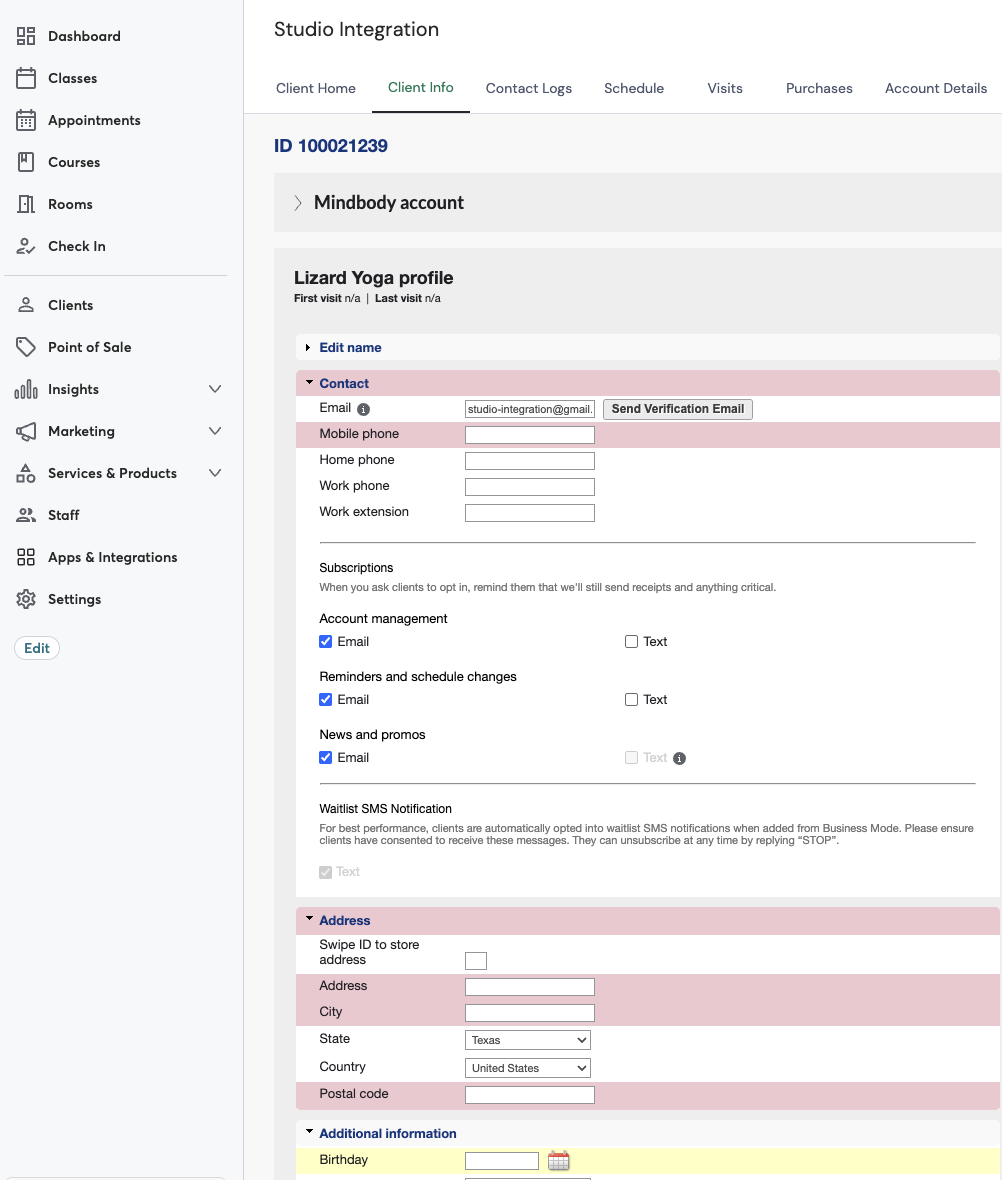
Every detail, in its right place.
No guessing where anything lands. Here's exactly how each piece shows up inside Mindbody.
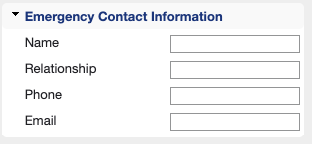
Emergency Contact
Name, relationship, phone & email
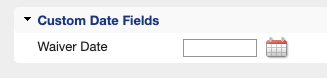
Waiver Date
Custom field tracks when waiver was signed
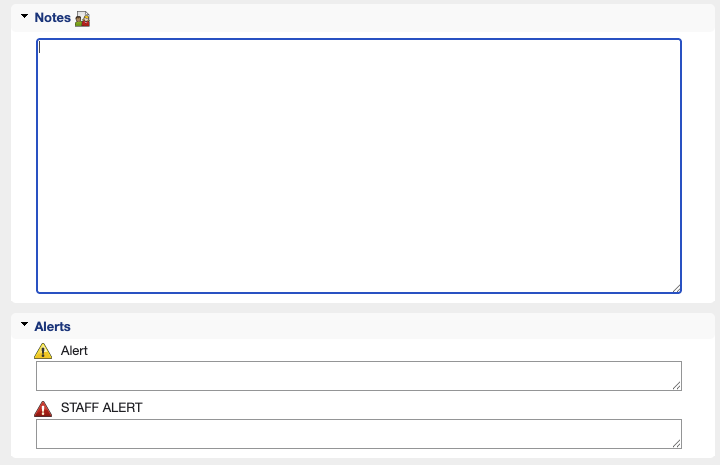
Client NotesStripe
Staff sees what was purchased at a glance
Purchase HistoryStripe
Service attached to client, payment method shows "Stripe"

Scroll horizontally to see the full table on mobile.
How it appears in Mindbody
Option A: $0 with Discount
Shows full price with a matching discount applied. Mindbody records $0 since payment was collected via Stripe.
Option B: Full Amount Paid
Shows the full amount as paid in Mindbody. Use this if you want your Mindbody reports to reflect total revenue.
This is configurable per studio — we'll set it up based on your preference during onboarding.
Three fields that stay current.
Every waiver submission keeps these up to date on the client's profile — automatically.
Phone & Address
Contact info syncs directly from the waiver form
Birthday
Date of birth for age verification and promos
SMS Consent
Text preferences set automatically from opt-in
What you don't have to do.
We handle the technical work. You handle your clients.
Simple setup.
We'll walk you through everything. Most studios are up and running in one call.
Book a demo
We'll review your current setup and show you exactly how it works.
We configure everything
Connect your Mindbody and Stripe accounts. Map your products. Set up your waiver form.
Go live
Start accepting payments and collecting waivers. We're here if you need anything.
Ready to see it in action?
Book a quick demo. We'll walk through your specific setup and answer any questions.